TOOL GUIDE
Best AI Brainstorming Tools for Teams in 2026
Compare the best free and paid AI brainstorming tools for team workshops, parallel ideation, shared context, visual collaboration, and clearer decisions.
The best AI brainstorming tool is not the one that generates the longest idea list. It is the one that fits how your team contributes, shares context, evaluates trade-offs, and makes a decision.
Boardblend is best for shared-context team decisions. Miro is best for broad visual facilitation. FigJam is best for design teams. ChatGPT and Claude are strongest as flexible individual thought partners. The right choice depends on whether your recurring problem is solo exploration, a facilitated workshop, design collaboration, work management, or accountable convergence.
Which AI is best for brainstorming?
Start with the work you need to do. For solo ideas and quick revisions, ChatGPT or Claude is a useful starting point. For research-heavy brainstorming, compare how each works with your source material. For a team decision, choose a shared workspace that keeps individual contributions and the final rationale visible.
| Your task | Start with | What to check |
|---|---|---|
| Solo brainstorming | ChatGPT or Claude | Can you develop distinct approaches, challenge one, and refine it through follow-up questions? |
| Research-heavy brainstorming | Claude with project knowledge, or ChatGPT with supplied files and sources | Can you trace ideas to the relevant evidence and identify missing or conflicting information? |
| Team decisions with separate AI agents | Boardblend | Can teammates explore privately, contribute to a shared canvas, and review the final choice together? |
These are workflow recommendations based on documented capabilities. OpenAI's ChatGPT prompting guide covers brainstorming, follow-up revisions, files, and sources. Anthropic's Claude Projects guide explains how project knowledge supplies context to chats. Boardblend's team workflow combines participant-selected agents with one shared canvas. These capabilities were checked on September 7, 2026.
How to choose the best AI model for your brainstorm
ChatGPT and Claude are products that offer AI models; Boardblend is a workspace for your team's agents. First choose the workflow, then compare the models available to you using the same brief, evidence, and constraints.
Ask each model for three distinct approaches, the main assumption behind each, and a counterargument. Compare the usefulness of the ideas, fidelity to the brief, and how much unsupported information you must correct. Record the model and date so you can repeat the comparison when your task or available models change.
When a group must choose between the results, use the AI-assisted decision-making template to capture the evidence, trade-offs, owner, and next action.
The best AI brainstorming tools at a glance
| Tool | Best for | Main strength | Main trade-off |
|---|---|---|---|
| Boardblend | Shared-context team decisions | Parallel people and bring-your-own agents converge on one visual canvas | More focused than a general whiteboard suite |
| Miro | Facilitated visual work | Mature canvas, formats, integrations, facilitation, AI, and MCP | Breadth can require more workshop setup |
| Mural | Method-led workshops | Facilitation, templates, enterprise enablement, and guided AI workflows | Best value appears in recurring facilitated work |
| FigJam | Design-team ideation | Approachable multiplayer canvas beside Figma | Less focused on cross-functional decision governance |
| Lucidspark | Structured visual collaboration | Mind maps, voting, tables, diagrams, and facilitation | Strongest inside the Lucid ecosystem |
| ChatGPT | Flexible AI exploration | Fast ideation, files, research, analysis, projects, and canvas | Conversation is usually the primary surface |
| Claude | Long-context thought partnership | Projects, knowledge, careful analysis, and artifacts | Team convergence still needs an explicit shared process |
| Notion AI | Document-centric teams | AI inside shared knowledge and project documents | Visual divergence is not the core interaction |
| ClickUp | Ideas tied to delivery | Whiteboards near tasks, docs, goals, and project work | Work-management density can distract from ideation |
| Whimsical | Lightweight visual thinking | Fast diagrams, mind maps, wireframes, and docs | Lighter facilitation and decision governance |
AI brainstorming tools comparison
| Tool | Independent input | Shared visual context | AI contribution | Decision record | Best team shape |
|---|---|---|---|---|---|
| Boardblend | Core workflow | Core workflow | Participant-selected agents | Explicit close | Cross-functional decision teams |
| Miro | Private mode on paid plans | Excellent | Built-in AI, workflows, agents, MCP | Template dependent | Broad visual collaborators |
| Mural | Facilitation-led | Excellent | Built-in guided AI workflows | Workshop dependent | Facilitated enterprise teams |
| FigJam | Possible through facilitation | Excellent | Generate, sort, summarize | Voting and handoff | Product design teams |
| Lucidspark | Breakouts and facilitation | Excellent | Generate, group, summarize | Voting, tables, tasks | Visual planning teams |
| ChatGPT | Strong individually | Chat, projects, and canvas | Native | Document or project dependent | AI-first knowledge workers |
| Claude | Strong individually | Projects and artifacts | Native | Document or artifact dependent | Research-heavy teams |
| Notion AI | Page or database workflow | Document based | Native | Strong written record | Documentation-led teams |
| ClickUp | Form or task dependent | Whiteboard and work graph | Native | Strong task handoff | Delivery-focused teams |
| Whimsical | Manual | Strong lightweight canvas | Visual generation | Manual | Small, fast-moving teams |
Best free brainstorming tools for teams
The best free brainstorming tool depends on what you need to test. Avoid comparing products only by whether signup costs nothing. Check how many boards remain editable, who can participate, which AI actions are included, whether work is private, and what can be exported.
| Free option | Useful starting point | Limit to verify |
|---|---|---|
| Boardblend | One active brainstorm with the core shared-context workflow; invited participants join free | One owned brainstorm at a time |
| Miro | Broad visual collaboration, templates, three editable boards, and limited AI use on its Free plan | Board, privacy, visitor, and AI-credit limits |
| FigJam | Lightweight multiplayer brainstorming through Figma's free Starter plan | Shared-file, page, and AI-credit limits |
| Lucidspark | Visual ideation, comments, activities, and connections to structured diagrams | Workspace, collaboration, and AI limits on the current plan |
For free team brainstorming tools, run the same short exercise in two products. For free collaborative brainstorming tools, invite real participants instead of judging the facilitator's view alone. If AI is central, confirm that the free allowance covers generation, challenge, clustering, and synthesis—not only a demo action.
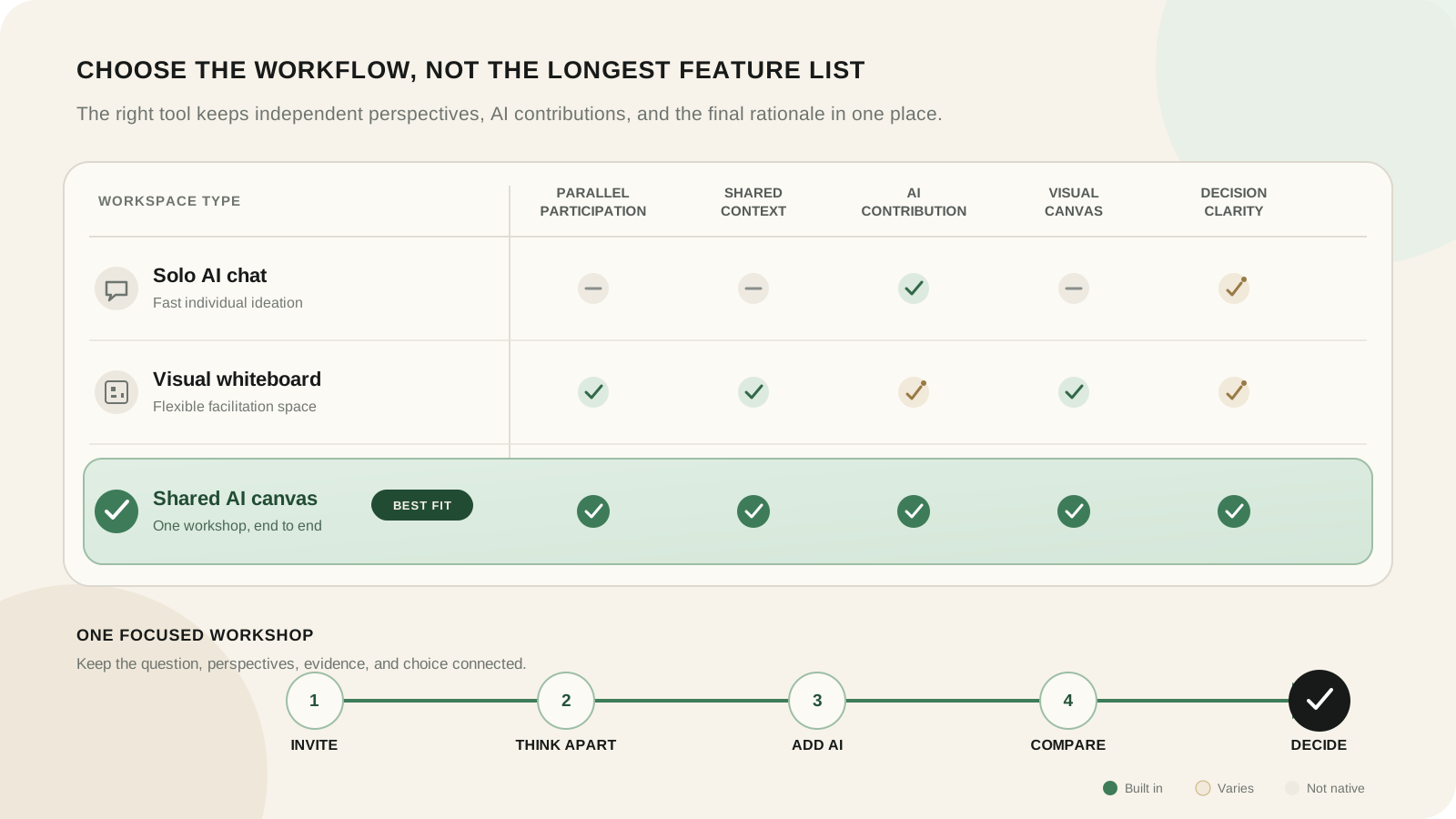
How we evaluated each tool
We used one identical scenario: product, design, and engineering must choose between improving onboarding, building an integration, and fixing a performance problem.
Team participation
Can each person contribute before being anchored by the first visible answer? Can quieter or asynchronous participants add a complete view?
Context quality
Can the team give AI relevant evidence and constraints? Does context remain visible and attributable, or disappear into separate chats?
Divergence and synthesis
Can the product generate genuinely different options, challenge assumptions, group contributions, and preserve conflicts instead of flattening them?
Decision capture
Does the workflow end with the chosen option, rationale, evidence, rejected alternative, owner, next action, and review trigger?
Facilitation, security, integrations, and value
We also considered guest access, workshop controls, accessibility, administration, approved AI use, integrations, setup, usage limits, and price. Security and pricing require organization-specific review; a public feature list cannot settle them.
1. Boardblend—best for shared-context team decisions
Boardblend is designed for teams that want distinct human and AI perspectives without turning the session into one shared prompt. Each teammate can connect a preferred agent, contribute in parallel, and bring relevant context onto one visual surface.
Its strength is convergence: evidence, disagreements, criteria, and the decision remain connected. Choose it for product, strategy, engineering, or cross-functional workshops where the output must be more accountable than a list of themes.
Use the seven-step AI brainstorming guide to run the workflow.
2. Miro—best for facilitated visual work
Miro is the broadest product in this list. Its official pricing page describes whiteboards, Docs, Tables, Timelines, Kanban, Slides, diagrams, prototypes, more than 7,000 templates, more than 250 integrations, AI workflows and agents, and MCP connectivity.
Miro also supports private contribution, voting, timers, visitor editing, and AI clustering and summaries. Choose it when visual work extends across many formats and teams. Choose a focused alternative when the recurring job is specifically parallel human-and-agent thinking followed by a documented decision. See the detailed Miro alternatives comparison.
If Boardblend and Miro are your shortlist, use the focused Boardblend vs Miro comparison.
3. Mural—best for method-led workshops
Mural is strong for facilitators, consultants, and organizations that run repeatable visual methods. Its official AI page highlights idea generation, mind maps, clustering, summaries, and Microsoft 365 connections; July 2026 release notes describe more guided AI actions.
Choose Mural when facilitation practice, templates, and organization-wide workshop adoption matter most.
If Mural and Boardblend are your finalists, see Boardblend vs Mural.
4. FigJam—best for design-team ideation
FigJam combines a friendly multiplayer whiteboard with Figma’s design ecosystem. The official Figma pricing page lists timers, voting, open sessions, diagrams, tables, and AI that generates, sorts, and summarizes board content.
Choose FigJam when ideation stays close to design critique, prototypes, components, and handoff. Boardblend is a better fit when participant-specific agents and decision rationale are the central workflow.
For that cross-functional trade-off, read Boardblend vs FigJam.
5. Lucidspark—best for structured visual collaboration
Lucidspark blends freeform ideation with dynamic mind maps, visual activities, tables, voting, breakout boards, facilitator controls, and connections to formal diagrams. Its official product page describes AI generation, theme finding, and summaries.
Choose it when brainstorming should flow into Lucidchart, structured planning, or task systems.
For the decision-workflow trade-off, read Boardblend vs Lucidspark.
6. ChatGPT—best flexible AI thought partner
ChatGPT is excellent for framing a problem, generating alternatives, analyzing files, researching, challenging assumptions, and drafting a decision record. Its official pricing page lists projects, canvas, data analysis, deep research, connectors, custom GPTs, and workspace controls across plans.
For teams, the limitation is not intelligence. It is process visibility: separate conversations do not automatically become one comparable visual decision. Use ChatGPT for individual exploration, or connect it to a shared team workflow that preserves provenance.
See Boardblend vs ChatGPT for the shared-project, chat, and visual-canvas trade-offs.
7. Claude—best long-context thought partner
Claude is particularly useful for analyzing substantial context and producing careful documents or visual artifacts. Anthropic’s Projects documentation describes shared project knowledge and organization sharing on work plans; its Artifacts documentation covers reusable documents, diagrams, tools, and visualizations.
Choose Claude for research-heavy exploration and substantial context. Add an explicit convergence step when several teammates have separate chats.
8. Notion AI—best for document-centric teams
Notion AI is compelling when the source material, project plan, meeting notes, and decision record already live in Notion. AI can work near shared documents and databases, reducing copy-and-paste overhead.
Choose it when the durable written record matters more than spatial brainstorming. Test whether independent contribution and visual comparison are sufficient for your workshops.
9. ClickUp—best for ideas connected to execution
ClickUp places whiteboards and AI near tasks, docs, owners, goals, and delivery status. It is a strong option when the primary pain is turning workshop output into assigned work.
Choose it when execution continuity outweighs a specialized brainstorming experience. Keep a clear facilitation structure so task-management details do not narrow exploration too early.
10. Whimsical—best for lightweight visual thinking
Whimsical makes flowcharts, mind maps, wireframes, and collaborative documents fast to create and easy to read. It suits small teams that value clarity and low setup.
Choose it for lightweight visual explanation and structured ideation. Use a separate decision record if rationale, dissent, and governance must be explicit.
Why most AI brainstorming remains a solo activity
AI products are usually designed around one person, one context window, and one response stream. Even a shared workspace can leave each teammate in a separate conversation. Copying final answers into a board hides the reasoning, uncertainty, and evidence that produced them.
Boardblend treats the team as the unit of work. People and their agents can think in parallel, then share selected context and compare contributions on one canvas. The distinction is not “AI versus collaboration”; it is whether collaborative structure reaches inside the AI-assisted thinking process.
Seven questions to ask before choosing
- Can people contribute independently before seeing a dominant answer?
- Can teammates use approved AI tools with relevant context?
- Are human, AI, and source contributions attributable?
- Can the group compare alternatives and disagreements visually?
- Does the workflow end with rationale, owner, and next action?
- Do permissions, retention, exports, and administration fit policy?
- What do real participant seats and expected AI usage cost?
Run a 30-minute test for your shortlist
Give three teammates the same roadmap decision and context pack. Ask them to form independent views, use the product’s real AI workflow, reveal contributions, challenge the favourite, compare criteria, and record a decision.
Measure setup time, participation balance, option variety, evidence traceability, synthesis quality, and whether a person who missed the meeting can understand what was decided. The best AI ideation tool is the one that improves this complete outcome for your team.
COMMON QUESTIONS
Frequently asked questions
What is the best AI brainstorming tool for teams?
Boardblend is the focused option for parallel teammate and agent contributions that converge on one decision. Miro is stronger for broad whiteboarding, FigJam for design teams, and ChatGPT or Claude for individual exploration.
What are the best free brainstorming tools for teams?
Boardblend is a focused free option for one active team brainstorm, while Miro and FigJam provide broader free visual workspaces with plan limits. Compare collaboration, AI allowances, privacy, exports, and whether the workflow records a decision before choosing.
Can teammates use different AI models in one brainstorm?
Yes, if the workflow supports separate connections and approved data handling. Boardblend is designed around bring-your-own agents, while other tools may provide built-in AI, shared workspaces, or external connectivity.
What features matter most for remote team brainstorming?
Prioritize independent contribution, shared context, clear provenance, asynchronous access, facilitation, evidence links, structured evaluation, decision capture, permissions, accessibility, and reliable exports.
How is an AI canvas different from an AI chat?
A visual canvas keeps options, evidence, relationships, and disagreements visible at once. Chat is excellent for sequential exploration, but important context and parallel viewpoints can become buried in a transcript.
How were these AI brainstorming tools evaluated?
We applied one product-roadmap workshop to each category and compared participation, context, divergence, synthesis, visual structure, decision capture, facilitation, integrations, governance, setup, and value as of August 1, 2026.
PUT IT INTO PRACTICE
Turn everyone’s thinking into one clear next step.
See how teams use Boardblend, or open a shared canvas and start now.