TOOL GUIDE
The Best Miro Alternatives for AI Brainstorming
Compare Miro alternatives for AI team brainstorming, visual collaboration, facilitation, shared context, agent workflows, pricing, and clearer decisions.

The best Miro alternative depends on what your team is replacing. Miro is no longer “just a whiteboard”: it combines visual collaboration, structured formats, facilitation, integrations, prototypes, built-in AI workflows, and external AI connectivity. A credible alternative must win for a particular job rather than copy a smaller subset of that breadth.
For AI brainstorming that must end in a documented team decision, Boardblend is the most focused option. For facilitated enterprise workshops, choose Mural. For design teams, choose FigJam. For diagramming and structured visual planning, choose Lucidspark. Miro remains the strongest general-purpose choice for many organizations.
Best Miro alternatives by use case
| Tool | Best for | Honest reason to choose it |
|---|---|---|
| Boardblend | Shared-context AI team decisions | Participants and their own agents contribute in parallel, then converge on one decision canvas |
| Mural | Facilitated workshops | Mature facilitation practices, templates, enterprise collaboration, and expanding AI workflows |
| FigJam | Design collaboration | Tight connection to Figma, approachable multiplayer canvas, voting, and useful AI organization |
| Lucidspark | Structured visual collaboration | Strong facilitation, mind maps, tables, voting, and connection to Lucidchart |
| ClickUp | Ideas connected to execution | Whiteboards live close to tasks, docs, goals, and project delivery |
| Whimsical | Lightweight diagrams | Fast flowcharts, wireframes, mind maps, and collaborative documents |
| Excalidraw | Simple sketching | Minimal, open-source visual collaboration with a hand-drawn feel |
Miro alternatives comparison
| Tool | Visual canvas | Team facilitation | AI support | External-agent fit | Path to decision |
|---|---|---|---|---|---|
| Boardblend | Focused shared canvas | Parallel contribution and convergence | Bring-your-own agents | Core workflow | Explicit rationale and next action |
| Mural | Broad infinite canvas | Strong | Built-in generation, clustering, summaries, and guided workflows | Integrations vary | Workshop-led |
| FigJam | Multiplayer whiteboard | Strong for design workshops | Generate, sort, and summarize | Figma MCP is oriented to design and development context | Voting and handoff |
| Lucidspark | Infinite canvas plus structured objects | Strong | Generate, sort, and summarize | Check current integrations | Voting, tables, and task handoff |
| ClickUp | Whiteboards inside work management | Moderate | ClickUp AI across work | Platform integrations | Direct task conversion |
| Whimsical | Fast visual documents | Lightweight | AI-assisted visual creation | Limited compared with broad platforms | Manual documentation |
| Excalidraw | Minimal drawing canvas | Lightweight | Not the core product | Developer ecosystem varies | Manual documentation |
This table describes product orientation, not every feature. “External-agent fit” is especially dependent on plan, permissions, and the client your team uses.
Why teams consider alternatives to Miro
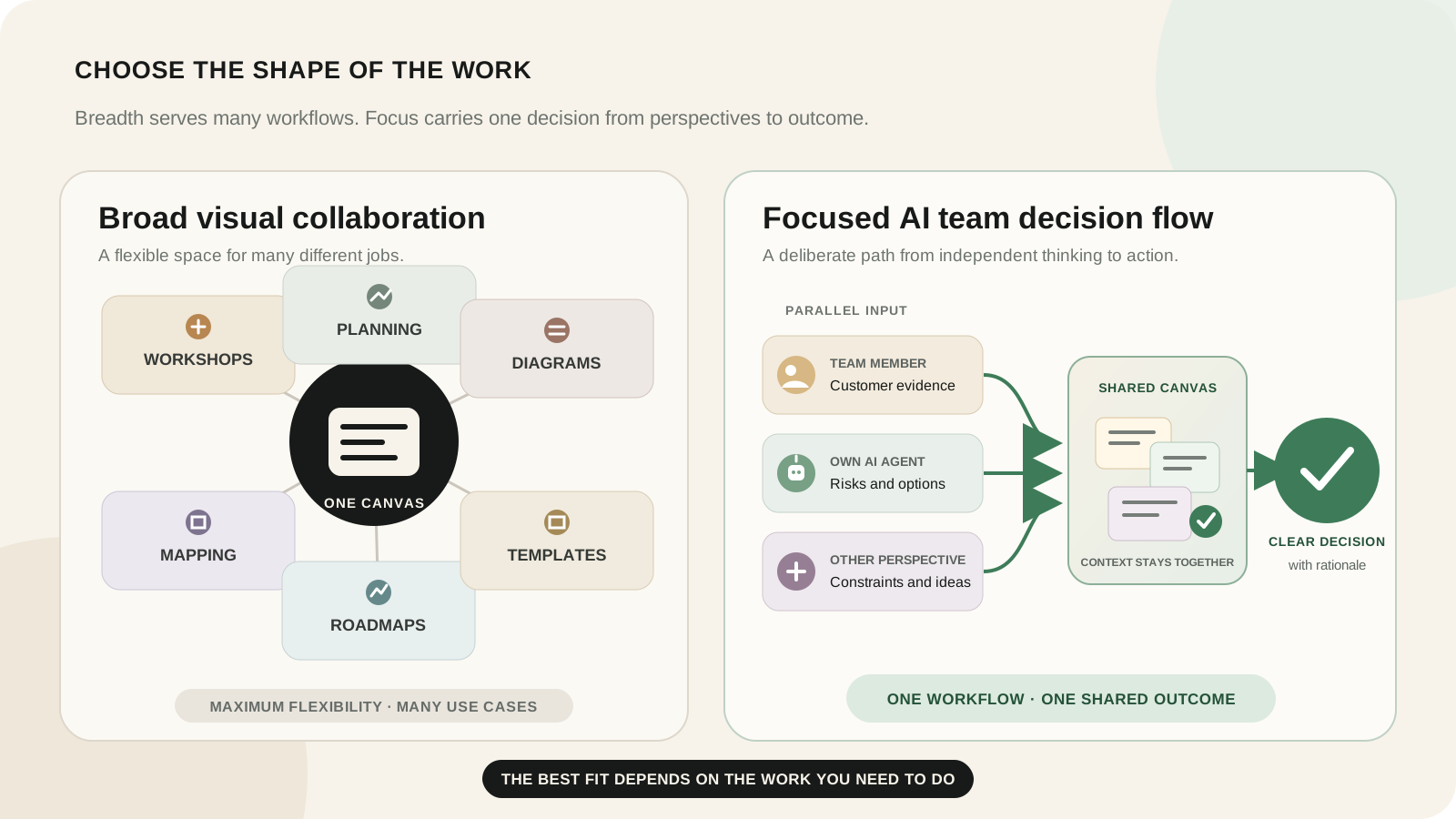
Purpose-built decisions versus a broad visual workspace
Miro’s breadth is a genuine strength. Its official pricing page lists boards, Docs, Tables, Timelines, Kanban, Slides, diagrams, prototypes, more than 7,000 templates, and more than 250 integrations. Teams that use several of those formats benefit from one flexible platform.
Breadth also means the team must design its own decision process. If the recurring job is narrower—collect independent perspectives, involve several AI agents, compare trade-offs, and preserve one decision—a focused workflow can require less setup.
Complexity, seats, AI credits, and limits
Miro’s official pricing showed these annual-billing rates when reviewed:
| Miro plan | Price shown | Selected limits |
|---|---|---|
| Free | $0 | Three editable boards, 10 pooled AI credits monthly, 100 MCP calls daily |
| Starter | $8 per member monthly, billed yearly | Unlimited private boards, visitor editing, facilitation tools, 25 AI credits per license monthly, 500 MCP calls daily |
| Business | $20 per member monthly, billed yearly | Unlimited workspaces and guests, advanced diagrams, prototypes, AI workflows and agents, 50 AI credits per license monthly, 2,000 MCP calls daily |
| Enterprise | Custom, from 30 members | Governance, regional hosting, AI controls, SCIM, audit trails, and 10,000 MCP calls daily |
Miro says annual billing saves 20%. Its AI credit documentation says credits are pooled, reset monthly, and do not roll over. Compare the cost of the actual participant roles and AI usage your workshops require, not just the entry price.
Built-in AI versus teammate-selected agents
Miro already offers capable AI. Its AI overview describes generation, clustering, summaries, diagrams, tables, action plans, Flows, and Sidekicks. Miro also offers MCP connectivity, so it would be inaccurate to say external agents are absent.
The Boardblend difference is the participant model: each teammate can connect a preferred agent to the same brainstorm while keeping contributions attributable. The team sees how product, design, engineering, or other functions reached their views before asking AI to synthesize them.
How we evaluated the alternatives
We used one workshop: a product team must choose whether to improve onboarding, build a requested integration, or fix a performance problem.
Each product was considered against the same questions:
- Can people contribute independently before seeing the group’s answer?
- Can AI expand and challenge several participant perspectives?
- Does the tool preserve sources, evidence, and disagreements?
- Can a facilitator move from divergence to evaluation?
- Is the final rationale visible beside the original inputs?
- How much setup, template work, and tool switching is required?
- Are permissions, guest access, usage limits, and pricing understandable?
This is not a universal score. A diagramming team and a decision workshop should not weight the criteria the same way.
Boardblend—best for shared-context team decisions
Boardblend is designed for a specific sequence: people think in parallel, their preferred AI agents help expand or challenge those views, contributions meet on one shared visual canvas, and the team records a decision.
Choose it when the outcome matters more than maintaining an all-purpose whiteboard library. Its advantage is not a larger object palette; it is the relationship between separate participant context and shared team context.
For a copyable process, use the seven-step AI brainstorming workshop.
Mural—best for facilitated workshops
Mural is a strong choice for facilitators running repeatable workshops across a large organization. Its official site emphasizes an infinite canvas, templates, facilitation, product and strategy workflows, and AI-assisted ideation and synthesis. Mural’s July 2026 release notes describe guided AI workflows for ideas, diagrams, summaries, and rewrites.
Choose Mural for method-driven facilitation, consulting workshops, and enterprise enablement. Evaluate Boardblend when the narrower requirement is multiple participant-and-agent perspectives converging on a traceable decision.
FigJam—best for design collaboration
FigJam is the natural alternative for teams already working in Figma. The official Figma pricing page lists multiplayer editing, voting, timers, open sessions, diagrams, and AI features that generate, sort, and summarize content.
Choose FigJam when brainstorming is closely connected to design artifacts, critiques, and handoff. Its shared vocabulary with Figma is more valuable than an isolated feature comparison.
Lucidspark—best for structured visual collaboration
Lucidspark combines freeform ideation with structured tools. Its official product page highlights dynamic mind maps, visual activities, AI generation and summarization, tables, facilitator controls, breakout boards, voting, and connections to Lucidchart and task systems.
Choose it when ideas need to become diagrams, structured plans, or work items inside the Lucid ecosystem.
ClickUp—best for connecting ideas to execution
ClickUp is a work-management platform first. Its whiteboards make sense when the team wants ideas near tasks, documents, goals, owners, and delivery status. This can shorten handoff after a workshop, although teams should test whether the brainstorming experience itself provides enough independence and clarity.
Whimsical—best for lightweight diagrams
Whimsical is fast and restrained. It is a strong fit for teams that mainly need flowcharts, wireframes, mind maps, and lightweight collaborative documents. Choose it when a polished visual explanation matters more than elaborate facilitation or multi-agent decision governance.
Excalidraw—best for simple visual collaboration
Excalidraw offers a direct sketching experience with an open-source foundation and recognizable hand-drawn style. It is useful for quick explanations and low-ceremony collaboration. Decision structure, AI workflows, and durable governance generally need to come from the team’s process or surrounding tools.
Miro versus Boardblend in one workshop
In Miro, a facilitator can use private mode for independent contribution, reveal responses, cluster notes with AI, vote, and build an action plan. Miro’s private mode documentation makes it clear that the platform can reduce early anchoring on paid plans.
In Boardblend, the same workshop begins with participant-specific human and agent contributions and keeps that provenance visible as the team evaluates options. The focused close is a decision record with rationale, dissent, owner, and next action.
Miro wins when the team needs broad templates, formats, integrations, facilitation controls, and enterprise administration. Boardblend wins when a recurring AI-assisted decision should have less setup and a clearer relationship between individual perspectives and the shared conclusion.
For a criterion-by-criterion analysis, read Boardblend vs Miro.
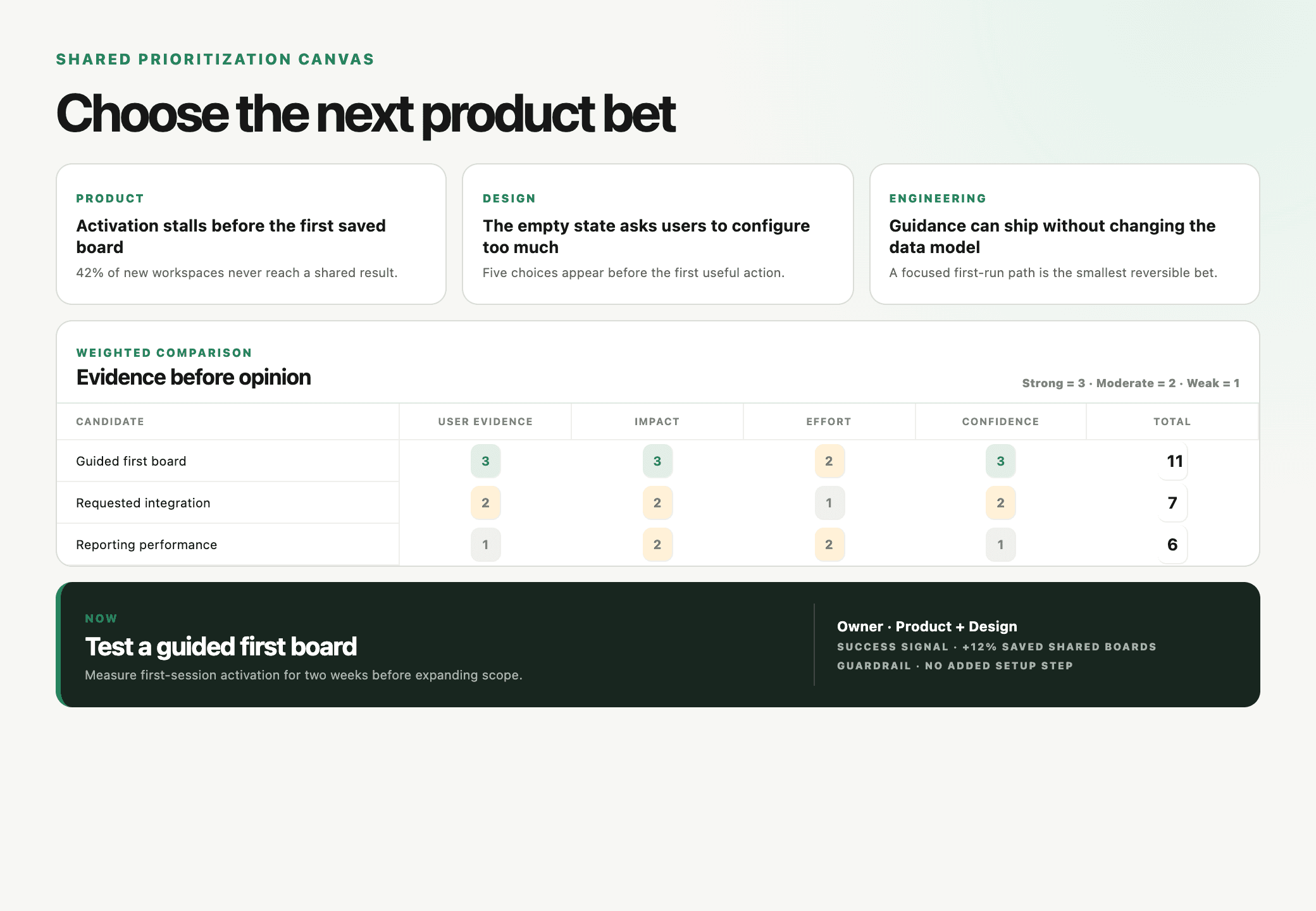
A scenario-based selection matrix
| If your team primarily needs… | Start with… |
|---|---|
| One platform for many visual work formats | Miro |
| Participant-specific agents and a focused decision flow | Boardblend |
| Facilitated enterprise workshops and methods | Mural |
| Design-team ideation beside Figma work | FigJam |
| Whiteboarding connected to formal diagrams | Lucidspark |
| Brainstorming directly beside tasks and delivery | ClickUp |
| Fast, lightweight visual documents | Whimsical |
| Open-source, low-ceremony sketching | Excalidraw |
Run a 20-minute test before switching
Do not compare empty canvases. Run one real decision in your two finalists:
- Give three participants the same decision and evidence.
- Ask them to contribute independently.
- Let each use the AI workflow it would use in production.
- Reveal and group the results.
- Compare two viable options against explicit criteria.
- Record the decision, strongest rejected alternative, unresolved risk, owner, and next action.
Then measure setup time, participation balance, AI usefulness, evidence traceability, and whether someone who missed the meeting can understand the decision. That result is more useful than a feature-count leaderboard.
COMMON QUESTIONS
Frequently asked questions
What is the best Miro alternative for AI brainstorming?
Boardblend is the focused choice when teammates and their preferred AI agents need to contribute in parallel and converge on a shared decision. Mural, FigJam, and Lucidspark are stronger fits for different workshop, design, or diagramming needs.
Does Miro support AI and MCP?
Yes. As of July 26, 2026, Miro offers AI generation, clustering, summaries, workflows, agents, and an MCP server on every plan with plan-specific credit and call limits.
Which Miro alternatives support free visual collaboration?
Miro, FigJam, Lucidspark, Whimsical, Excalidraw, ClickUp, and Boardblend all provide some form of free access or trial, but limits and guest rules vary. Verify current pricing before choosing.
Can a team use personal AI agents instead of built-in whiteboard AI?
Miro supports external AI tools through MCP. Boardblend focuses on participant-specific bring-your-own-agent connections within one shared brainstorm. Test the exact agent, permissions, and context flow your team needs.
How were these Miro alternatives evaluated?
We compared the same team-decision workflow across contribution, AI, facilitation, visual structure, convergence, integrations, governance, setup, and pricing. Capability and pricing claims were reviewed from primary sources on July 26, 2026.
PUT IT INTO PRACTICE
Turn everyone’s thinking into one clear next step.
See how teams use Boardblend, or open a shared canvas and start now.