PRODUCT COMPARISON
Boardblend vs Miro for AI Team Brainstorming
Compare Boardblend and Miro for AI brainstorming, shared context, visual collaboration, personal agent workflows, facilitation, and team decisions.
Boardblend and Miro overlap in visual collaboration, AI assistance, and team brainstorming, but they optimize for different scopes.
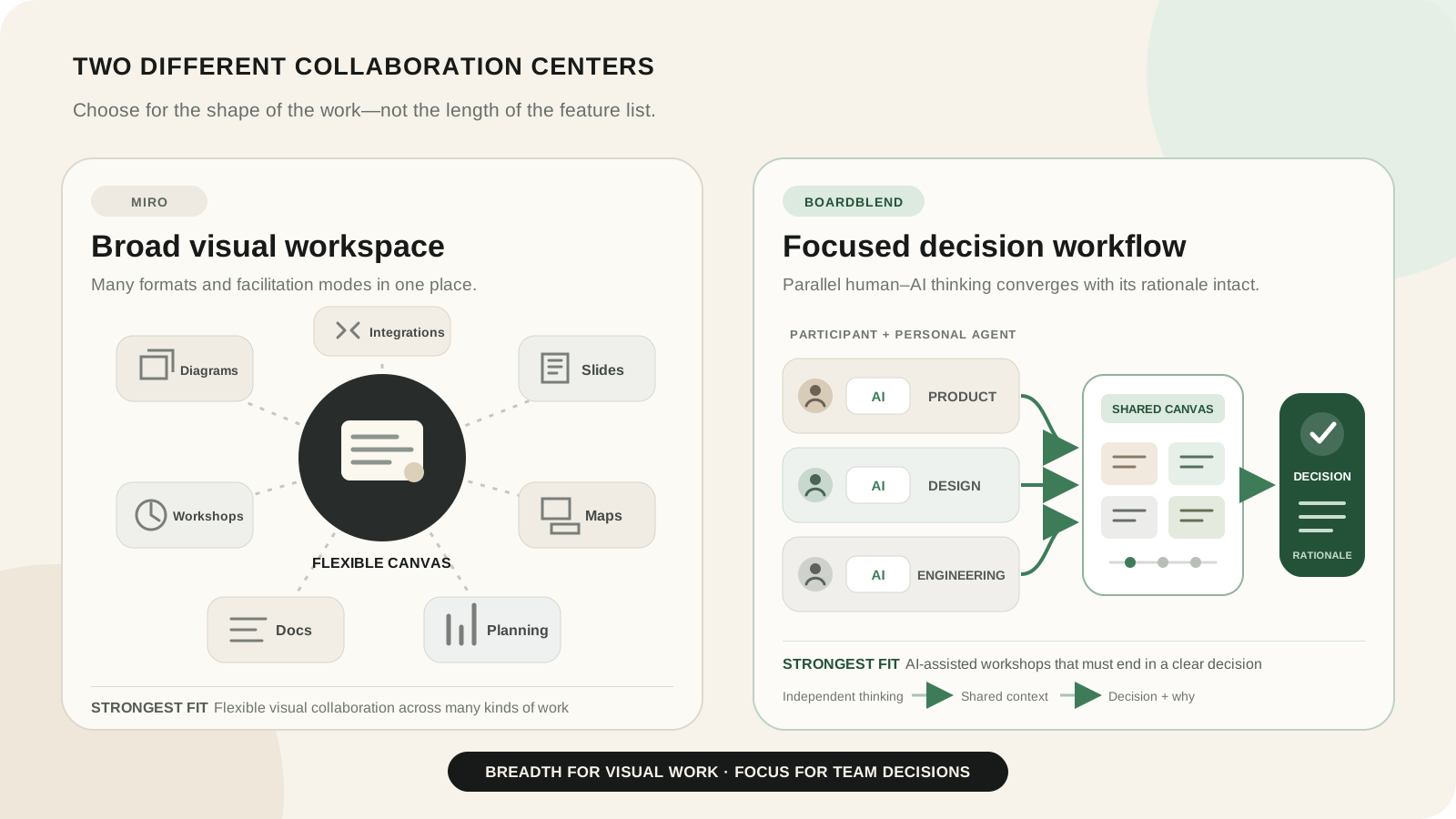
Choose Miro for a broad, mature visual workspace. Choose Boardblend for a focused workflow where teammates and their preferred AI agents think in parallel, share context, and converge on a documented decision.
Boardblend vs Miro at a glance
Choose Boardblend when…
- the recurring job is an AI-assisted team decision;
- teammates should bring their own agents;
- independent contributions and provenance matter;
- the team wants one focused canvas with a clear close; or
- less workshop setup is more valuable than a large template library.
Choose Miro when…
- the organization needs one workspace for many visual formats;
- facilitators rely on timers, voting, private mode, activities, and visitor editing;
- teams need extensive templates and integrations;
- diagramming, prototypes, planning, and documentation share one canvas; or
- enterprise administration and governance are central requirements.
The fundamental difference
Boardblend is a focused human-and-agent decision workspace
Boardblend treats every participant as a source of context. People can connect preferred AI agents, work in parallel, and bring relevant contributions onto one shared visual canvas. The session progresses toward criteria, trade-offs, rationale, ownership, and a next action.
Miro is a broad visual innovation platform
Miro’s official pricing page lists boards, Docs, Tables, Timelines, Kanban, Slides, diagrams, prototypes, thousands of templates, hundreds of integrations, facilitation tools, built-in AI, agents, workflows, and MCP.
That breadth is not clutter when teams use it. It is a substantial advantage. It also means Miro does not prescribe one decision workflow; the facilitator composes it from a broad toolkit.
Feature comparison
| Criterion | Boardblend | Miro |
|---|---|---|
| Primary orientation | AI-assisted team decisions | Broad visual collaboration and innovation |
| Shared visual canvas | Yes | Yes |
| Participant-specific agents | Core product model | External tools connect through MCP; Miro also offers Sidekicks and agents |
| Independent contribution | Parallel participant workflow | Private mode on paid plans |
| Built-in AI generation | Agents contribute through participant connections | Extensive Miro AI features |
| Decision rationale | Focused close | Achievable through templates and structured formats |
| Facilitation controls | Purpose-specific | Mature timers, voting, private mode, activities, and visitor roles |
| Templates and formats | Focused | Extensive |
| Integrations | Focused agent connections | More than 250 listed integrations plus MCP |
| Enterprise administration | Emerging product scope | Mature Business and Enterprise controls |
How AI works in each product
Boardblend’s teammate-owned agents and shared context
Each Boardblend participant can connect an agent that already supports their work. Product, design, and engineering can use different tools or instructions while contributing to the same brainstorm. The shared canvas makes selected context, sources, disagreements, and conclusions visible.
The design goal is not several uncoordinated bots. It is parallel human judgment supported by agents, followed by team convergence.
Miro AI, Sidekicks, Flows, and MCP
Miro has serious AI capabilities. Its AI overview describes generation, clustering, summaries, diagrams, tables, documents, action plans, Sidekicks, and reusable Flows. Its MCP documentation describes bidirectional connections with external AI tools.
Do not choose Boardblend because you believe Miro lacks AI or external agents. Choose it if its participant-owned, focused decision flow better matches the work.
Brainstorming and parallel participation
Miro’s private mode lets participants add content without seeing others’ contributions before reveal, and can make authors anonymous. That is a strong way to reduce anchoring in a facilitated workshop.
Boardblend builds parallel contribution into the participant-and-agent model. Contributions remain attributable because the team often needs to understand which function, evidence, or agent produced a view.
For the facilitation sequence, see how to brainstorm with AI and groupthink examples.
Shared canvas and visual organization
Miro wins on general visual expressiveness. Teams can combine many objects, formats, diagrams, frames, embeds, and workflows. Skilled facilitators can create highly tailored experiences.
Boardblend intentionally constrains the experience around a live decision canvas. It is easier to understand when the goal is options, evidence, trade-offs, and a decision; it is not a replacement for every diagram or visual planning use case.
Moving from ideas to a decision
Both products can support convergence. Miro can cluster with AI, vote, create tables, generate summaries, and draft action plans. Boardblend focuses on preserving original contributions and the relationship between criteria, disagreement, rationale, owner, and next action.
If the team’s Miro practice already ends with a high-quality decision record, switching tools may provide little benefit. If boards regularly end as unowned clusters of sticky notes, a more opinionated close may help.
Facilitation, templates, and workshop controls
Miro is the clear winner for broad facilitation. Starter includes visitor editing, timer, voting, private mode, and notes. Business adds Engage activities and richer structured workflows. Its template and facilitator ecosystem is much larger.
Boardblend wins only for the narrower workshop it is designed to run: multiple people and agents contributing to one accountable decision.
Integrations and existing workflows
Miro lists more than 250 integrations and adds deeper connections on higher plans. It is a better fit when the board must connect across a large established stack.
Boardblend’s distinctive integration is bring-your-own AI agents through shared session connections. Evaluate whether that is more important than the surrounding integration catalogue.
Setup, learning curve, and administration
Boardblend has a smaller surface and a direct no-sign-up brainstorm creation flow. That reduces first-session setup for its core use case.
Miro requires more configuration because it supports more outcomes, but many organizations already have templates, facilitators, permissions, and administration in place. For them, the incremental learning cost may be low.
Pricing and limits
Miro’s public annual-billing prices on the review date were:
| Plan | Public price | Relevant limits |
|---|---|---|
| Free | $0 | Three editable boards, 10 pooled AI credits monthly, 100 MCP calls daily |
| Starter | $8/member/month billed yearly | 25 AI credits per license monthly, 500 MCP calls daily |
| Business | $20/member/month billed yearly | 50 AI credits per license monthly, 2,000 MCP calls daily |
| Enterprise | Custom, from 30 members | Pooled credits, 10,000 MCP calls daily, advanced governance |
Miro says annual billing saves 20%, AI credits reset monthly without rollover, and extra credits are available on paid plans. Compare current Boardblend pricing and Miro pricing using the exact seats, guests, AI actions, and administration your team needs.
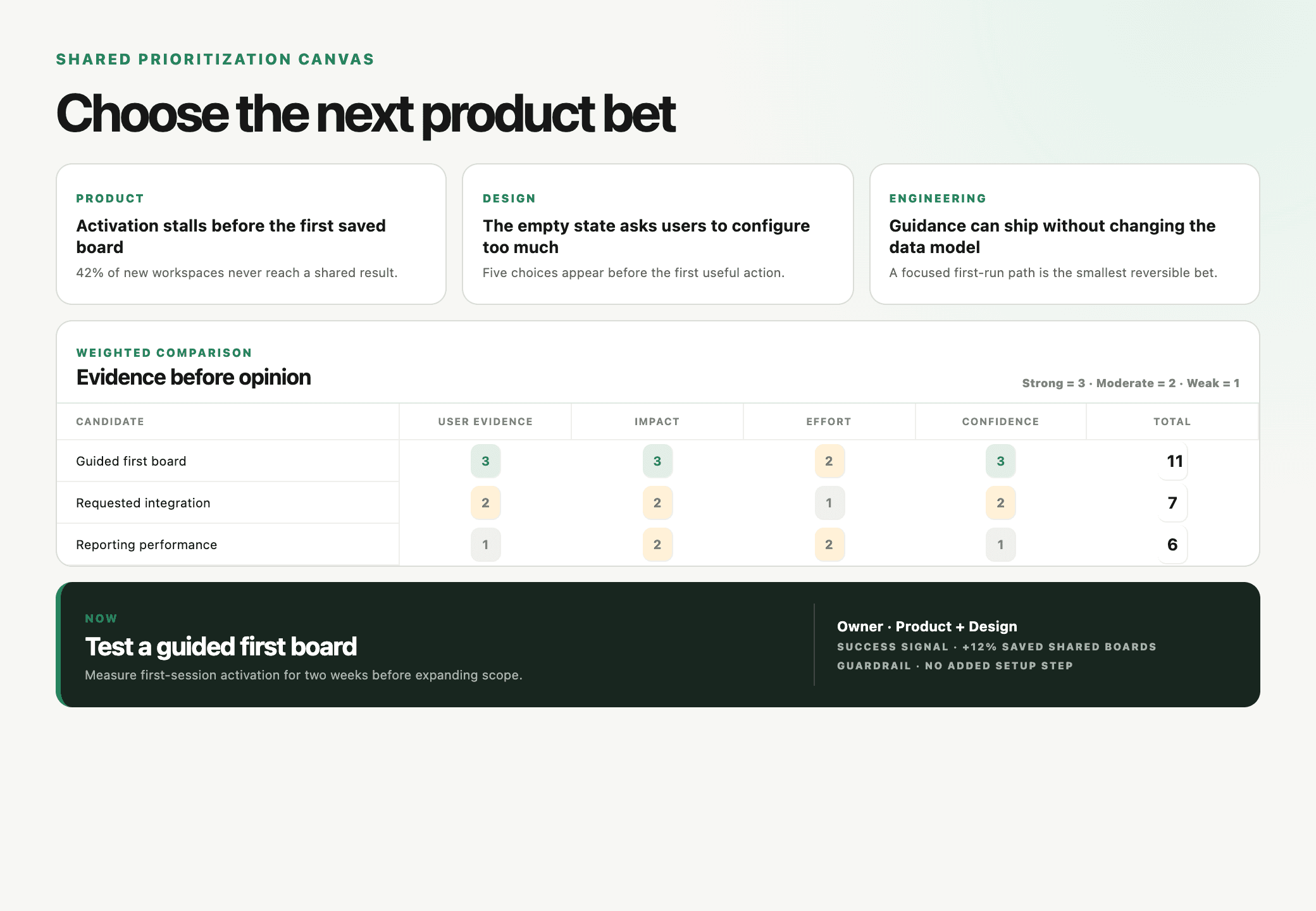
Worked comparison: prioritizing a product roadmap
The team must choose onboarding, integration, or performance work.
In Miro: the facilitator prepares frames and criteria, turns on private mode, reveals contributions, uses AI clustering, runs voting or scoring, and creates an action plan. This is flexible and facilitation-rich.
In Boardblend: product, design, and engineering contribute independently with their own agents, add evidence to a shared context, compare disagreements, and close with a decision record. This is narrower and more opinionated.
In both, the team chooses performance work after evidence shows severe problems among valuable customers. Miro’s strongest artifact is a versatile workshop board. Boardblend’s strongest artifact is the traceable relationship between participant reasoning and the final decision.
Which product should your team choose?
| Choose… | When the decisive requirement is… |
|---|---|
| Boardblend | Participant-specific agents, parallel thinking, and a focused decision record |
| Miro | Visual breadth, facilitation, templates, integrations, and enterprise maturity |
| Both | Miro for broad planning and Boardblend for selected consequential decisions |
Run the same real workshop in both products. Compare setup, participation, AI usefulness, evidence traceability, and the final artifact. Feature counts matter less than whether the team can understand and act on the decision afterward.
COMMON QUESTIONS
Frequently asked questions
Is Boardblend a complete replacement for Miro?
No. Miro covers broader whiteboarding, diagramming, planning, prototypes, integrations, and enterprise administration. Boardblend is a focused alternative for parallel human-and-agent brainstorming that ends in a clear decision.
Does Miro support external AI agents?
Yes. Miro offers an MCP server on every plan with plan-specific call limits and supports AI tools such as Claude, Cursor, GitHub Copilot, and Gemini CLI.
Which product is better for facilitated workshops?
Miro is stronger for general facilitation because it offers mature timers, voting, private mode, visitor editing, templates, and activities. Boardblend is stronger when the workshop specifically centers on participant-owned agents and decision convergence.
Which product is simpler for AI-assisted team decisions?
Boardblend is more focused and requires less process design for its core use case. Miro can run a strong decision workshop, but the facilitator chooses and configures the board, modes, AI actions, and decision template.
Can a team use Boardblend and Miro together?
Yes. A team can retain Miro for broad visual planning and use Boardblend for consequential AI-assisted decisions. Avoid duplicating the authoritative decision record across both products.
PUT IT INTO PRACTICE
Turn everyone’s thinking into one clear next step.
See how teams use Boardblend, or open a shared canvas and start now.