PRODUCT COMPARISON
Boardblend vs FigJam for Team Brainstorming
Compare Boardblend and FigJam for AI brainstorming, visual collaboration, independent input, design workflows, cross-functional evidence, and decisions.

Boardblend and FigJam both support visual team brainstorming, but their strongest outcomes differ. FigJam is the better choice for design-led ideation and collaboration beside Figma. Boardblend is the focused FigJam alternative when product, design, engineering, and their AI agents must reconcile evidence and reach a traceable decision.
Boardblend vs FigJam at a glance
| Choose Boardblend when… | Choose FigJam when… |
|---|---|
| Cross-functional evidence must converge on a decision | Ideation should move naturally into Figma design work |
| Each teammate may use a preferred AI agent | The team wants one integrated FigJam AI workflow |
| Provenance and disagreement matter | Drawing, stickies, reactions, diagrams, and critique matter |
| The final rationale is the key artifact | The visual workshop or design exploration is the key artifact |
| A focused workflow is preferable | Figma ecosystem continuity is preferable |
Different products for different outcomes
FigJam is a collaborative whiteboard inside the Figma platform. It is approachable, expressive, and familiar to many product-design teams. It supports open-ended ideation, diagrams, critique, voting, timers, audio, comments, and AI-assisted board work.
Boardblend is narrower. It coordinates differentiated participant and agent reasoning on one shared canvas, then closes with options, evidence, trade-offs, rationale, ownership, and a next action.
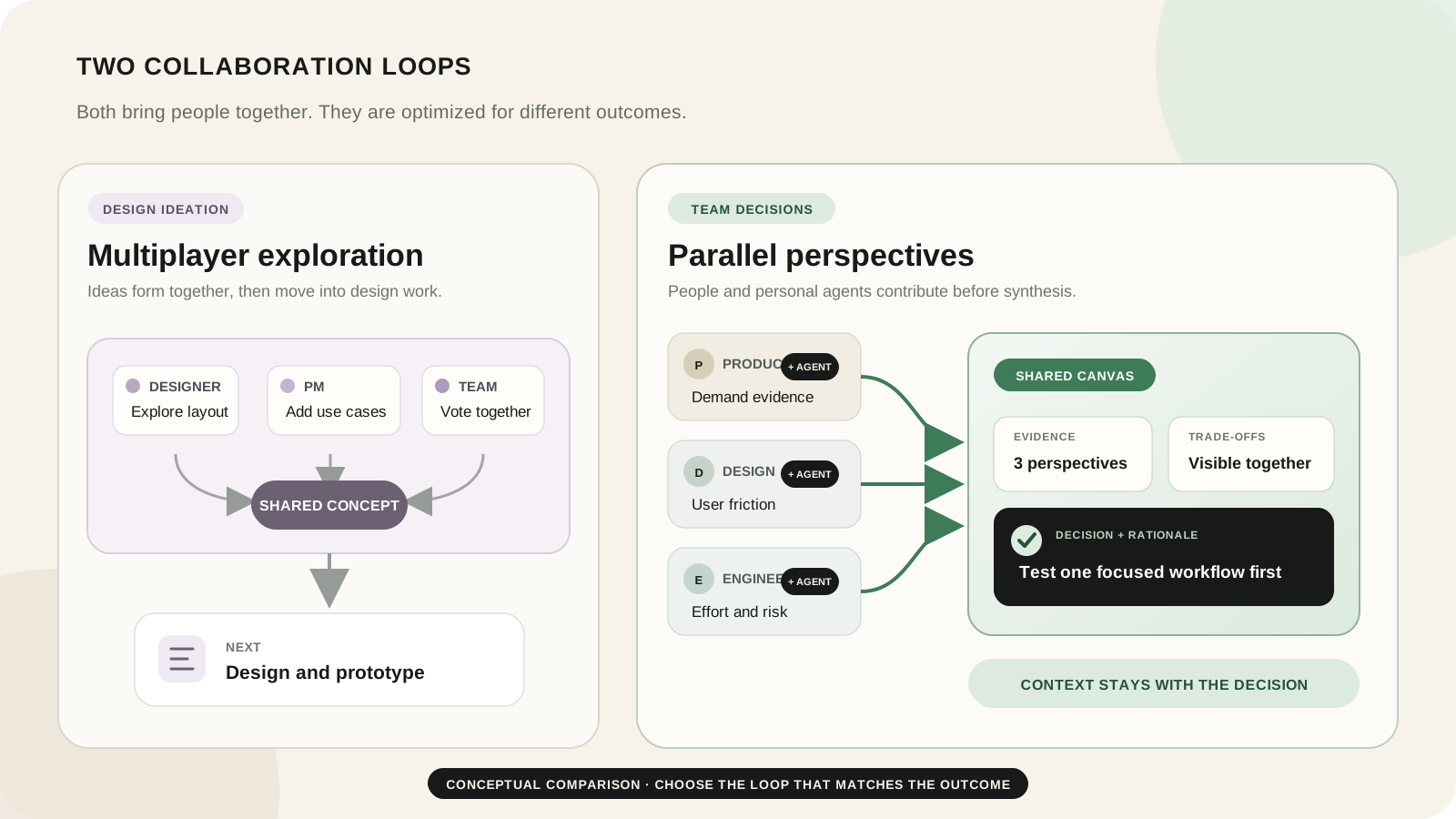
Feature comparison
| Criterion | Boardblend | FigJam |
|---|---|---|
| Primary orientation | AI-assisted cross-functional decisions | Multiplayer visual ideation and design collaboration |
| Shared visual canvas | Yes | Yes |
| Participant-specific agents | Core product model | Not documented as the core FigJam AI workflow |
| Built-in AI | Through connected agents | Generate, sort, summarize, and Jambot-style actions |
| Drawing and visual freedom | Focused | Strong |
| Voting and facilitation | Purpose-specific | Voting, timer, open sessions, reactions, audio |
| Design ecosystem | Handoff dependent | Native Figma adjacency |
| Decision provenance | Explicit close | Facilitator-designed |
| Templates and plugins | Focused | Large Figma community and ecosystem |
Brainstorming workflow
FigJam makes it easy to open a board, add stickies, draw, react, vote, and guide a group through a visual activity. It is a strong replacement for a physical design-workshop wall.
Boardblend begins with separate participant contributions and agent support. The sequence is independent thinking, shared context, challenge, comparison, and decision. Use the seven-step AI workshop for the complete process.
AI capabilities
Multiple teammate-selected agents in Boardblend
Boardblend lets participants bring supported agents suited to their function. A product manager may use one tool for customer evidence, a designer another for research synthesis, and an engineer an agent grounded in technical context. The team sees the relevant contributions together without forcing one shared model.
FigJam AI generation, sorting, and summarization
Figma’s official FigJam AI documentation describes generating boards and visual structures, sorting sticky notes, summarizing content, and using AI actions to brainstorm and reframe ideas. That integrated experience is lower-friction than coordinating several agents.
Official sources reviewed did not describe participant-owned agents reasoning simultaneously over one shared decision context. Choose Boardblend only if that distinction matters in practice.
Visual flexibility and canvas controls
FigJam is the stronger freeform canvas. It supports drawing, shapes, connectors, stamps, reactions, code blocks, tables, diagrams, custom templates, and engaging workshop interactions.
Boardblend uses constraint to make decision state clearer. It is not the better tool for sketching a journey, mapping a service blueprint, or exploring visual design directions.
Product, design, and engineering collaboration
FigJam works well when all functions can participate in a visual workshop led by a product manager or designer. Its approachable interaction lowers contribution friction.
Boardblend has a stronger model for preserving role-specific evidence. In feature prioritization, product can attach outcome evidence, design can attach observed behaviour, and engineering can attach delivery ranges and dependencies before the team converges. See the feature prioritization guide.
Connection to design and prototyping
FigJam wins decisively when workshop output should become Figma design work. Designers already understand the platform, and brainstorms can stay within the same ecosystem as files, prototypes, components, and handoff.
Boardblend’s decision record can guide downstream design, but it does not replace that native relationship.
Synthesis, voting, and decision capture
FigJam can sort and summarize sticky notes with AI, and teams can vote on options. Those features support convergence. The facilitator still decides how to preserve evidence, why votes differ, and what the decision record contains.
Boardblend foregrounds those questions. It is designed to keep disagreements and sources visible beside the final rationale rather than treating the most-voted cluster as the answer.
Templates, plugins, and ecosystem
FigJam benefits from Figma’s large community, templates, plugins, and organization familiarity. Teams running many design methods should value that ecosystem honestly.
Boardblend’s smaller surface is useful when template choice and canvas design feel like overhead for a recurring decision workflow.
Pricing and access
The official Figma pricing page provides a free Starter plan and paid Full, Dev, and Collab seats. FigJam access and AI credits vary by seat and plan; the current page listed platform-wide AI credit allocations and noted that amounts may change.
Open sessions can simplify workshop access, though Figma’s official materials state participants still log in. Compare the exact mix of editors, collaborators, viewers, AI usage, and Figma products with Boardblend’s current pricing.
Worked comparison: choosing a feature direction
A team must choose between a guided workflow, a flexible dashboard, and a command interface.
In FigJam: design prepares three concept areas, participants add feedback and references, FigJam AI summarizes themes, the group votes, and the selected direction moves into Figma exploration. This is the stronger workflow when the decision is inseparable from visual concept development.
In Boardblend: product, design, and engineering contribute evidence and risks with their own agents. The team discovers the command interface has enthusiastic expert support but weak first-time usability evidence. It selects a guided workflow experiment and records what would reopen the alternative.
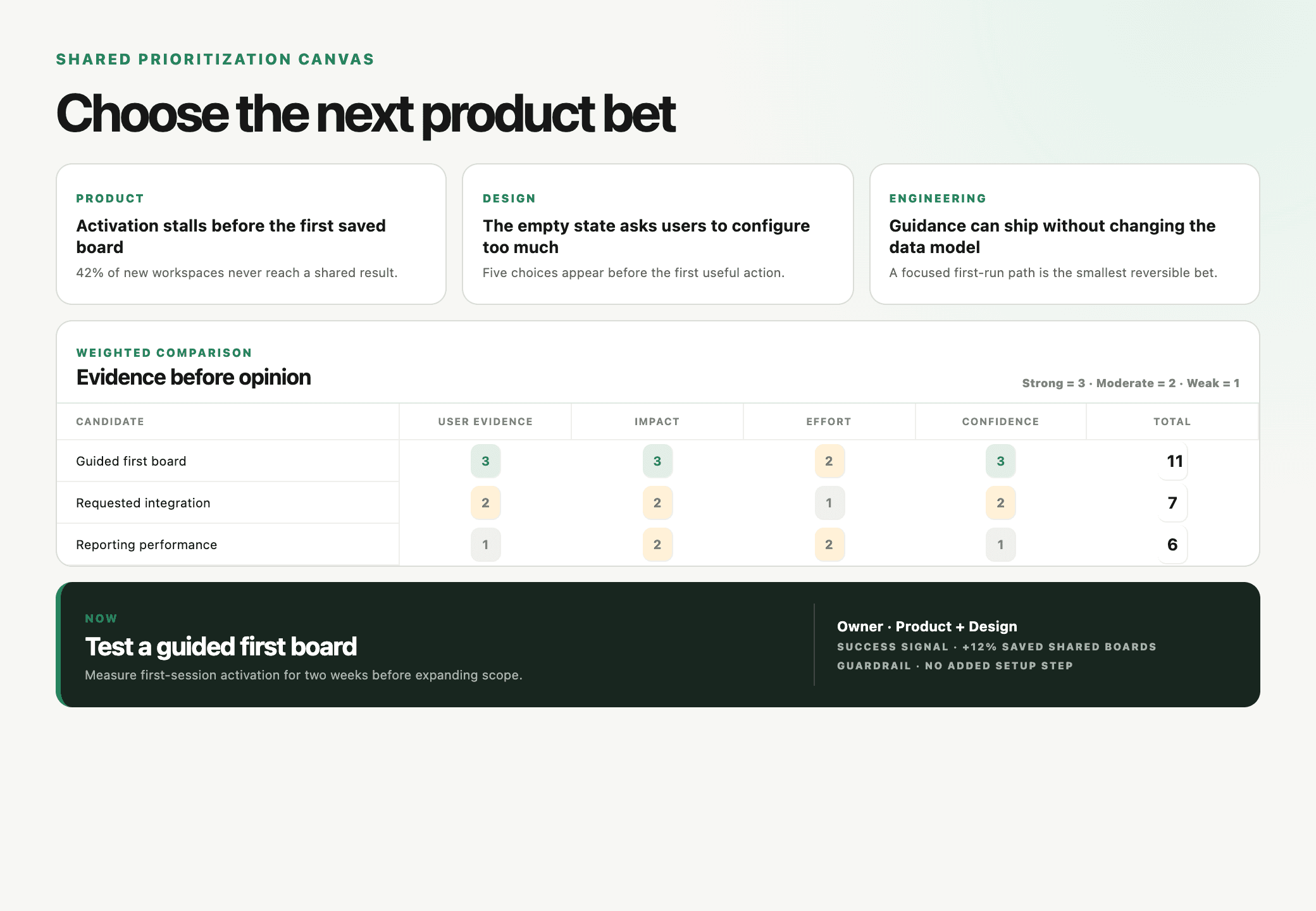
Choose Boardblend or FigJam?
Choose FigJam for design-led workshops, visual expression, critique, voting, community templates, and seamless movement into Figma.
Choose Boardblend for cross-functional choices where different people and agents must preserve evidence, reconcile disagreement, and document why one option won.
Use both when Boardblend owns the decision record and FigJam owns design exploration. Make the handoff and source of truth explicit so the rationale does not drift.
COMMON QUESTIONS
Frequently asked questions
Is Boardblend a FigJam alternative?
Boardblend is a focused FigJam alternative for AI-assisted cross-functional decisions, but not a complete replacement for design workshops, freeform drawing, Figma adjacency, or FigJam's multiplayer facilitation features.
Which product is better for designers?
FigJam is usually better for designers because it sits beside Figma and supports familiar visual ideation, critique, diagrams, reactions, voting, and direct movement toward design work.
Does FigJam support AI brainstorming?
Yes. FigJam AI can generate workshop materials, diagrams, timelines, and plans, then sort and summarize sticky notes. Availability and AI credits depend on current plans and seats.
Which product handles cross-functional decisions better?
Boardblend is more focused on separate product, design, engineering, and agent perspectives, visible disagreement, shared evidence, and a final rationale. FigJam can support this when a facilitator builds the process.
Can Boardblend output move into Figma?
Teams can use the Boardblend decision and rationale to guide Figma work, but verify current export or integration support for the exact handoff. FigJam remains the more native option inside the Figma ecosystem.
PUT IT INTO PRACTICE
Turn everyone’s thinking into one clear next step.
See how teams use Boardblend, or open a shared canvas and start now.