PRACTICAL GUIDE
AI-Assisted Decision Making: How Teams Make Better Decisions
Use AI to compare options and challenge assumptions while people own the decision. Includes a copyable decision template and a worked build-versus-buy example.

AI-assisted decision making is most useful when AI improves the process without becoming the decision owner. It can organize evidence, widen the option set, expose assumptions, compare scenarios, and draft a rationale. People still define the goal, verify claims, weigh consequences, and remain accountable.
For teams, the central challenge is shared context. Separate AI chats may help individuals think, but the group cannot evaluate reasoning it cannot see. A better workflow preserves each perspective, brings relevant evidence onto one visual canvas, and uses AI for structured dissent and synthesis before a human decision.
A reusable AI-assisted decision-making template
Copy this record into a document or shared canvas. Fill in the question, owner, evidence, and criteria before asking AI to compare options. The decision owner completes the choice and next action after reviewing the analysis.
| Field | Fill in |
|---|---|
| Decision | The question; desired outcome; deadline |
| Owner and contributors | Who decides; who contributes; who must approve |
| Evidence | Source links and dates; verified facts; assumptions; missing information |
| Options | Plausible choices, including waiting or testing a smaller change |
| Criteria and constraints | What matters; how it will be assessed; limits that cannot be exceeded |
| AI analysis to verify | Option trade-offs; counterarguments; claims to check against sources |
| Human decision | Chosen option; decisive evidence; strongest rejected alternative and why |
| Open concerns | Unresolved risks; dissent; checks required before action |
| Next action | Named owner; deliverable; due date |
| Review | Success measure; review date; condition that would reopen or stop the decision |
Use this prompt with the completed inputs:
Compare our options against the criteria in this record. Use only the supplied evidence and name the source for each factual claim. Mark missing information as unknown. Show the strongest counterargument to each option and the checks a person must complete. Leave the final decision for the named owner.
The build-versus-buy example below shows how to fill in the record. The same format also works after a team AI brainstorming workshop or a feature prioritization session.
What AI improves—and what it should not decide
AI is well suited to bounded cognitive work:
- summarizing a supplied evidence set;
- generating meaningfully different options;
- identifying assumptions and missing stakeholders;
- drafting counterarguments and pre-mortems;
- applying an agreed comparison structure;
- finding contradictions across contributions; and
- turning a decision discussion into a first-pass record.
AI should not silently define success, invent evidence, choose ethical trade-offs, or own consequences. Its confidence is not calibrated authority. A fluent answer can still be outdated, incomplete, fabricated, or misaligned with the organization’s constraints.
The NIST AI Risk Management Framework emphasizes clear human roles, multiple perspectives, documented risk, and ongoing evaluation. Its human-AI interaction guidance notes that AI can amplify human bias under some conditions and complement people under others. The configuration and process matter.
Why team decision making fails before AI enters the room
Many weak decisions begin with process problems that AI can accelerate:
- the team has not agreed on the decision;
- one leader frames both the problem and preferred answer;
- evidence lives in separate documents and conversations;
- criteria change as the discussion progresses;
- people defend functions rather than test assumptions;
- a vote replaces investigation; or
- nobody records why the choice was made.
Adding a model to this environment produces faster output, not necessarily better judgment. Fix ownership, context, participation, and decision rights first.
AI versus human decision making
AI and people contribute different strengths. AI is fast at organizing supplied information, generating alternatives, applying a repeatable structure, and finding patterns across many contributions. People understand organizational context, relationships, values, consequences, and when a technically valid answer is unacceptable.
The useful comparison is not whether AI or a human is always better at making decisions. It is which parts of a specific decision can be assisted, which claims can be verified, and which person remains accountable. Use AI for analysis and challenge; use people for goals, judgment, approval, and consequences.
How AI helps in decision making: seven roles
1. Turn a vague topic into a decision
Ask AI to distinguish the outcome, options, constraints, stakeholders, owner, deadline, and missing context. The team must approve the framing before analysis continues.
2. Generate different mechanisms, not paraphrases
Request options that solve the problem through genuinely different approaches. Require the core assumption and trade-off for each.
3. Surface missing evidence
Give the model a bounded context pack and ask which claims lack support, which sources conflict, and what information would most reduce uncertainty.
4. Represent absent stakeholders
AI can prompt the team to consider affected users, operations, security, accessibility, finance, or support. It cannot replace those stakeholders, but it can reveal who should be consulted.
5. Challenge the emerging favourite
Use a red-team prompt: “Assume this option fails in six months. What did we overlook?” Ask what evidence would reverse the recommendation.
6. Apply criteria consistently
Once people define the criteria and weights, AI can check whether every option is evaluated using the same definitions. It should flag missing inputs instead of filling them with guesses.
7. Preserve the rationale
AI can draft the chosen option, decisive evidence, strongest rejected alternative, dissent, uncertainty, owner, next action, and review trigger. A person must verify the record before it becomes authoritative.
AI decision-making examples
| Team decision | Useful AI role | Human responsibility |
|---|---|---|
| Product roadmap | Group evidence, generate alternatives, and challenge impact assumptions | Choose criteria, verify customer evidence, and own prioritization |
| Build versus buy | Compare cost, timing, dependency, and risk scenarios | Validate estimates, approve security, and accept vendor risk |
| Marketing campaign | Generate distinct concepts and test them against the brief | Protect brand judgment, confirm claims, and approve spend |
| Operations change | Find failure modes and draft a reversible rollout | Confirm frontline constraints, safety, and rollback authority |
| Hiring process | Structure job evidence and check inconsistent criteria | Prevent discrimination, protect privacy, and retain qualified human review |
These examples show the role of AI in decision making: it improves the evidence and options available to a team, but it does not inherit accountability.
A human-led AI decision-making process and framework
Define the owner and deadline
State who makes the decision, who contributes, who must approve, and when the choice is due. Collaboration does not require ambiguous authority.
Establish evidence, constraints, and criteria
Create one context pack with sources, known facts, disputed claims, non-negotiable constraints, and the criteria the team will use. Separate evidence from assumptions.
Think independently and use agents in parallel
Ask participants to form an initial view before seeing a shared AI recommendation. Each person can use an approved agent to expand or challenge their domain reasoning.
This protects the diversity of information that teams often lose through early convergence. See how to avoid groupthink and the seven-step AI workshop for practical facilitation.
Combine outputs on one visual canvas
Bring recommendations, evidence, risks, and agent contributions into a shared view. Preserve the owner and source. Do not replace the raw inputs with one polished summary.
Challenge sources, confidence, and assumptions
For every important claim, ask:
- Where did this come from?
- Is it current and applicable?
- What would make it false?
- How confident are we, and why?
- Which affected perspective is missing?
Score trade-offs
Use the lightest comparison that fits the decision: pros and cons, value versus effort, weighted criteria, scenario analysis, or a reversible experiment. Keep uncertainty visible beside the score.
For product choices, the cross-functional feature prioritization guide shows how to connect scores to role-specific evidence.
Make and record the human decision
The named owner closes the process. Record the rationale, rejected alternative, unresolved risk, owner, next action, and review trigger. If the team cannot say what new evidence would reopen the choice, it may be defending a conclusion rather than managing uncertainty.
Worked example: build versus buy
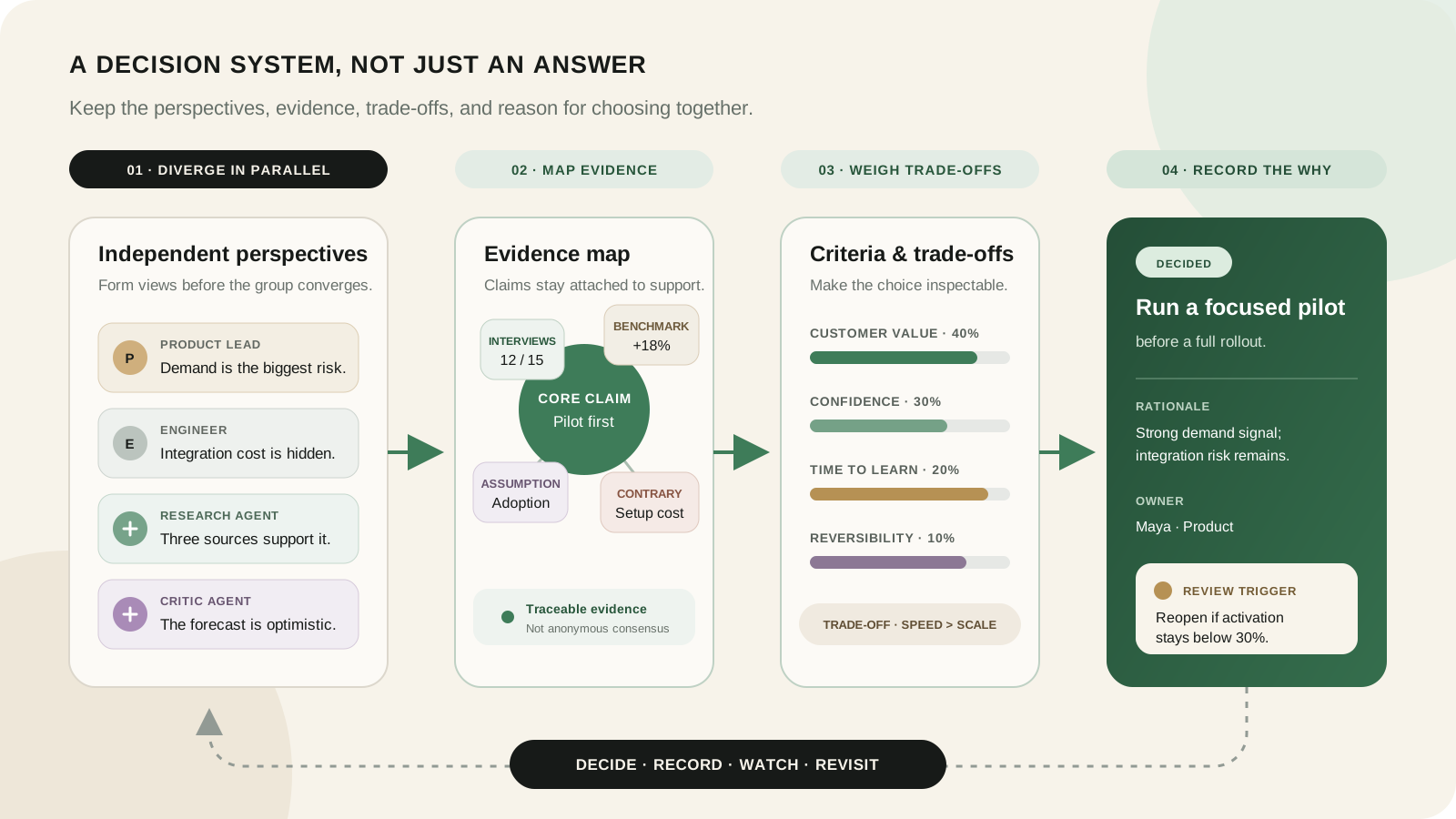
In this illustrative example, a software team needs customer-data synchronization. It can build an internal connector platform, buy an integration service, or run a manual process while validating demand. The thresholds below are sample team choices, not measured Boardblend results.
Product supplies customer reach, urgency, willingness to pay, and strategic importance. Engineering maps API variability, security, maintenance, and delivery ranges. Finance compares total cost, vendor exposure, and opportunity cost. Support contributes failure patterns and operating burden.
Each function asks an agent to challenge its initial view. The product agent questions whether requests represent sustained use. The engineering agent identifies the hidden maintenance surface. The finance agent tests volume and pricing scenarios.
| Option | Strength | Main risk | Evidence gap |
|---|---|---|---|
| Build | Control and strategic leverage | Long delivery and continuing maintenance | Uncertain breadth of paid demand |
| Buy | Fast launch and broad connector coverage | Vendor cost, limits, and dependency | Real-world reliability at target volume |
| Validate manually | Low commitment and rapid learning | Does not scale and creates operational work | Whether usage persists after onboarding |
The team chooses a six-week pilot of the integration service. Its completed decision record makes the commitment and exit conditions explicit:
| Field | Example entry |
|---|---|
| Decision | Choose how to validate customer-data synchronization over the next six weeks |
| Owner and contributors | Product lead decides; engineering and support contribute; security approves data handling |
| Evidence | Customer requests show interest; engineering estimates show ongoing connector maintenance; sustained usage is still unknown. Attach the underlying notes and estimates. |
| Options | Build a connector platform; pilot an integration service; validate manually |
| Criteria and constraints | Test demand within six weeks; stay below a $500 monthly service-cost cap; use approved data handling |
| AI analysis to verify | Check the vendor's connector coverage, volume limits, and cost assumptions against documentation and a technical trial |
| Human decision | Pilot the service. Defer a full build until repeated use justifies maintenance; reject manual operation for this trial because it would obscure automation reliability. |
| Open concerns | Reliability at target volume is unproven. Complete security approval before connecting customer data. |
| Next action | Engineering lead prepares a limited trial by the end of week one; support records failures and manual interventions |
| Review | At week six, continue only if at least 3 of 5 pilot accounts use synchronization weekly during the final two weeks and at least 99% of scheduled syncs succeed. Stop earlier if service cost exceeds $500 per month or data handling fails review. |
If the pilot misses a threshold, the owner reviews why before extending it. Proven demand combined with a vendor cost or reliability problem can reopen the build option; weak demand supports stopping further investment.
Risks and guardrails
| Risk | Guardrail |
|---|---|
| Fabricated or stale claims | Require source links and human verification |
| Automation bias | Capture independent judgment before AI advice |
| Sensitive-data exposure | Use approved tools and minimum necessary context |
| False consensus across agents | Compare sources and model assumptions |
| Opaque criteria | Let people define and document the rules |
| Lost accountability | Name a human decision owner |
| Repeated historical bias | Include affected stakeholders and test outcomes |
NIST’s AI RMF Core recommends differentiated human-AI roles, diverse teams, documented oversight, mapped impacts, and continuous management. For a team workshop, those principles translate into explicit ownership, source visibility, review, and a mechanism to revisit the decision.
When not to use AI
Avoid general AI assistance when the information cannot be shared with the service, the task requires licensed judgment the team lacks, the model cannot be meaningfully verified, or the cost of a wrong answer is high and approved controls are absent.
Sometimes the fastest responsible decision is to consult an expert, collect primary evidence, or run a small real-world test.
How to measure decision quality
Separate three measures:
Process quality: Did relevant perspectives contribute independently? Were sources, criteria, dissent, and ownership clear?
Outcome quality: Did the chosen option produce the expected result without unacceptable harm or cost?
Learning quality: Did the team define review triggers, detect surprises, and update its reasoning when evidence changed?
Do not evaluate only whether the result was good. A sound process can encounter bad luck, and a careless process can get lucky. Review both the reasoning available at the time and what happened afterward.
Boardblend supports this human-led model by keeping participant reasoning, bring-your-own AI agents, evidence, and the final decision in one shared context. The goal is not to make AI sound decisive. It is to help the team make its reasoning clearer.
COMMON QUESTIONS
Frequently asked questions
Can AI make better decisions than a team?
AI can improve parts of a process by organizing evidence, generating alternatives, and challenging assumptions. Decision quality still depends on valid context, accountable people, relevant expertise, and verification.
What decisions should never be delegated entirely to AI?
Do not delegate accountability for legal, medical, employment, safety, security, financial, or other high-impact decisions to a general AI system. Use qualified review, approved systems, and applicable governance.
How can teams prevent automation bias?
Capture independent judgments before revealing AI advice, show uncertainty and sources, require counterarguments, make override responsibility explicit, and track when people accept or reject model suggestions.
Can multiple AI agents improve a team decision?
Multiple agents can widen perspectives when they use relevant context and distinct roles. They can also repeat the same error, so compare evidence and assumptions rather than treating agreement between models as proof.
How should a team measure decision quality?
Track process quality, outcome quality, and learning speed. Review whether relevant perspectives entered, assumptions were tested, the expected outcome occurred, and the team updated its model when new evidence arrived.
How does AI help in decision making?
AI can organize evidence, generate alternatives, expose assumptions, compare scenarios, challenge a preferred option, and draft a decision record. People must still verify claims, weigh consequences, and own the decision.
What is an example of AI-assisted decision making?
A product team can give AI customer evidence, engineering constraints, and decision criteria, then use it to compare build, buy, and test options. A named human owner verifies the analysis and records the final choice.
PUT IT INTO PRACTICE
Turn everyone’s thinking into one clear next step.
See how teams use Boardblend, or open a shared canvas and start now.